Why Every Online Store Should Add an “Add to Wishr” Button
Many shoppers don’t buy on their first visit. An “Add to Wishr” button captures purchase intent, drives return visits, and unlocks gift-driven conversions — backed by data.
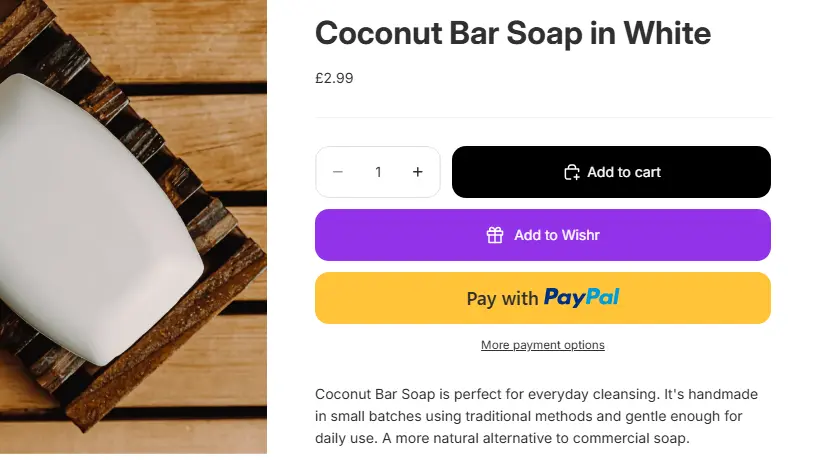
E-commerce isn't a straight line from "view product" to "buy now." For most users, the journey is a winding path across different devices, moods, and financial cycles.
A large share of shoppers browse with genuine interest but aren't ready to purchase in that moment. We usually see these visitors fall into three camps:
- The Payday-Waiters: They want the item but are balancing their monthly budget.
- The Comparison-Shoppers: They have five tabs open and are narrowing down their favorites.
- The Gift-Planners: They are building a list for a future birthday, wedding, or holiday season.
For most online stores, that reality creates a painful outcome: a shopper shows intent, then closes the tab… and the opportunity disappears. An "Add to Wishr" button solves this by turning "not today" into a saved decision — making it dramatically more likely the shopper returns.
Not Every Visitor Is Ready to Buy (And the Data Proves It)
Across industries, cart abandonment remains extremely high. Baymard’s ongoing research puts the average documented cart abandonment rate at about 70%.1That doesn’t mean shoppers dislike what they saw — it means the journey is often incomplete.
"58.6% of US online shoppers have abandoned a site in the last three months because they were 'just browsing' or 'weren't ready to buy'." — Baymard Institute
If your store only offers “Add to Cart” as the next step, you’re forcing a binary decision: buy now or leave. A wishlist option adds the missing third path: save it and come back.
Wishlists Capture Purchase Intent Without Adding Checkout Friction
A wishlist action is a powerful micro-conversion. It’s easier than purchasing, requires no payment, and doesn’t disrupt the shopper who is ready to buy. Most importantly, it captures a high-intent signal while respecting real-world timing.
Shoppers also expect this functionality. Google’s research found that 40% of shoppers surveyed said their shopping experience would be better if retailers offered a wishlist where they can save items they’re interested in.3
Closing the Gap Between Mobile Browsing and Desktop Buying
The "multi-device" journey is now the standard. A shopper might discover your product through an Instagram ad on their commute (mobile), but prefer to complete the checkout process at home where their credit card details are saved (desktop).
Without a way to "save," that mobile session often ends in a bounce. By providing a Wishr button, you allow the user to effectively "bookmark" the product in a way that follows them across devices. It prevents the most common loss in modern retail: the forgotten tab closure.
Best Practices for Placing Your "Add to Wishr" Button
Visibility is key to making this strategy work. While you don't want to distract from your "Buy" button, you want Wishr to be the obvious "Plan B." Consider these three high-conversion placements:
The Product Page (Primary)
Place the button near the "Add to Cart" button, but with a secondary visual weight (like an outline button or a heart icon).
Collection Pages (Quick-Save)
Add a small Wishr icon to the corner of product thumbnails. This allows "power-browsers" to shortlist items without leaving the search results.
The "Out of Stock" State
This is a massive missed opportunity. If a product is sold out, replace the "Add to Cart" button with "Add to Wishr" so the user doesn't leave your site empty-handed.
Why a Shareable Wishlist Beats a Private "Save" List
Most e-commerce platforms offer a basic "heart" icon that saves items to a private, hidden account. The problem? That data stays locked in a silo where only the shopper sees it.
Wishr transforms a private intent into a social one. When a user adds an item to a Wishr list, that list is often shared with friends and family for birthdays or holidays. You aren't just capturing one person's interest; you're putting your product in front of their entire social circle. One "save" can lead to a purchase from a completely different person.
"Save for Later" Prevents the Most Common Loss: Tab Closure
Nielsen Norman Group (one of the most trusted UX research firms) describes “Save for Later” as a way to prevent users from discarding items they won’t purchase right away — provided it’s easy to find and low-friction to use.4
From a business perspective, that matters because you’ve already paid the cost of acquiring that visitor (SEO, ads, or social content). A wishlist keeps your product in their personal consideration set — instead of disappearing with a closed browser tab.
Wishlists Create More Ways to Convert — Including Gift-Driven Purchases
A wishlist doesn't just help the original shopper. It creates additional routes to purchase:
Multiple Purchase Paths
- Gift buyers: Friends and family shopping for birthdays, Christmas, anniversaries
- Shared wishlists: A single saved item can be seen by multiple potential buyers
- Public visibility: Your products can be discovered via shared lists
This is especially valuable during major gifting seasons. The National Retail Federation forecast that US retail sales in November and December 2025 would total $1.01–$1.02 trillion, surpassing $1 trillion for the first time.5Whether you sell big-ticket items or small gifts, wishlists reduce friction for gift buyers by answering the hardest question: “What do they actually want?”
Saved Items Encourage Return Visits (The Mere Exposure Effect)
In psychology, the “mere exposure effect” describes how repeated exposure to a stimulus can increase positive feelings toward it over time.6
Translated into e-commerce: if someone liked your product enough to save it, seeing it again later — in the context of their own curated Wishr list — strengthens their preference. Every time they open their list to add something else, they see your product again, keeping your brand top-of-mind.
Conclusion
Most e-commerce stores invest heavily in acquiring visitors — but not enough in keeping purchase intent alive. An "Add to Wishr" button is a simple, low-friction way to retain interest, drive future conversions, and enable gift-driven sales through sharing.
In a world where attention is scarce and shopping journeys are fragmented across devices, wishlists aren't just a "nice-to-have" feature. They are a core conversion strategy for any store looking to grow in 2026. Remember:
- Capture purchase intent without adding checkout friction
- Bridge the gap between mobile browsing and desktop buying
- Enable gift-driven purchases through shareable lists
- Turn "not today" into saved decisions that drive return visits
Ready to add an "Add to Wishr" button to your store? Get started with Wishr today and start converting browsers into buyers.
Sources
- Baymard Institute — Cart Abandonment Rate Statistics. https://baymard.com/lists/cart-abandonment-rate
- Baymard Institute — UX Statistics (58.6% “just browsing / not ready to buy”). https://baymard.com/learn/ux-statistics
- Think with Google — Shopping wishlist preference statistics (40% want wishlists). https://www.thinkwithgoogle.com/consumer-insights/consumer-trends/shopping-wishlist-preference-statistics/
- Nielsen Norman Group — Wishlist or Shopping Cart: Saving Products for Later. https://www.nngroup.com/articles/wishlist-or-cart/
- National Retail Federation — NRF expects holiday sales to surpass $1 trillion for the first time in 2025. https://nrf.com/media-center/press-releases/nrf-expects-holiday-sales-to-surpass-1-trillion-for-the-first-time-in-2025
- Palumbo et al. — Review/discussion of the mere exposure effect. https://pmc.ncbi.nlm.nih.gov/articles/PMC7866445/